Short answer: yes, IPTV can be used on multiple devices. You can install your player app and log in on as many TVs, phones, tablets and computers as you like with the same details. What is limited is how many of them play at the same moment, a number called connections (or “devices at the same time”). On DodoIPTV that is 1 device on the 1, 3 and 6 month plans, 2 on the 1 Year plan, 3 on the 2 Year plan and 5 on the Lifetime plan. Go over the limit and the newest stream is refused or the oldest one is cut off.
This guide explains how connections work, how many you really need, how to set up one line across several screens, and how to fix the “max connections reached” error.
Installs vs Connections: The One Distinction That Matters
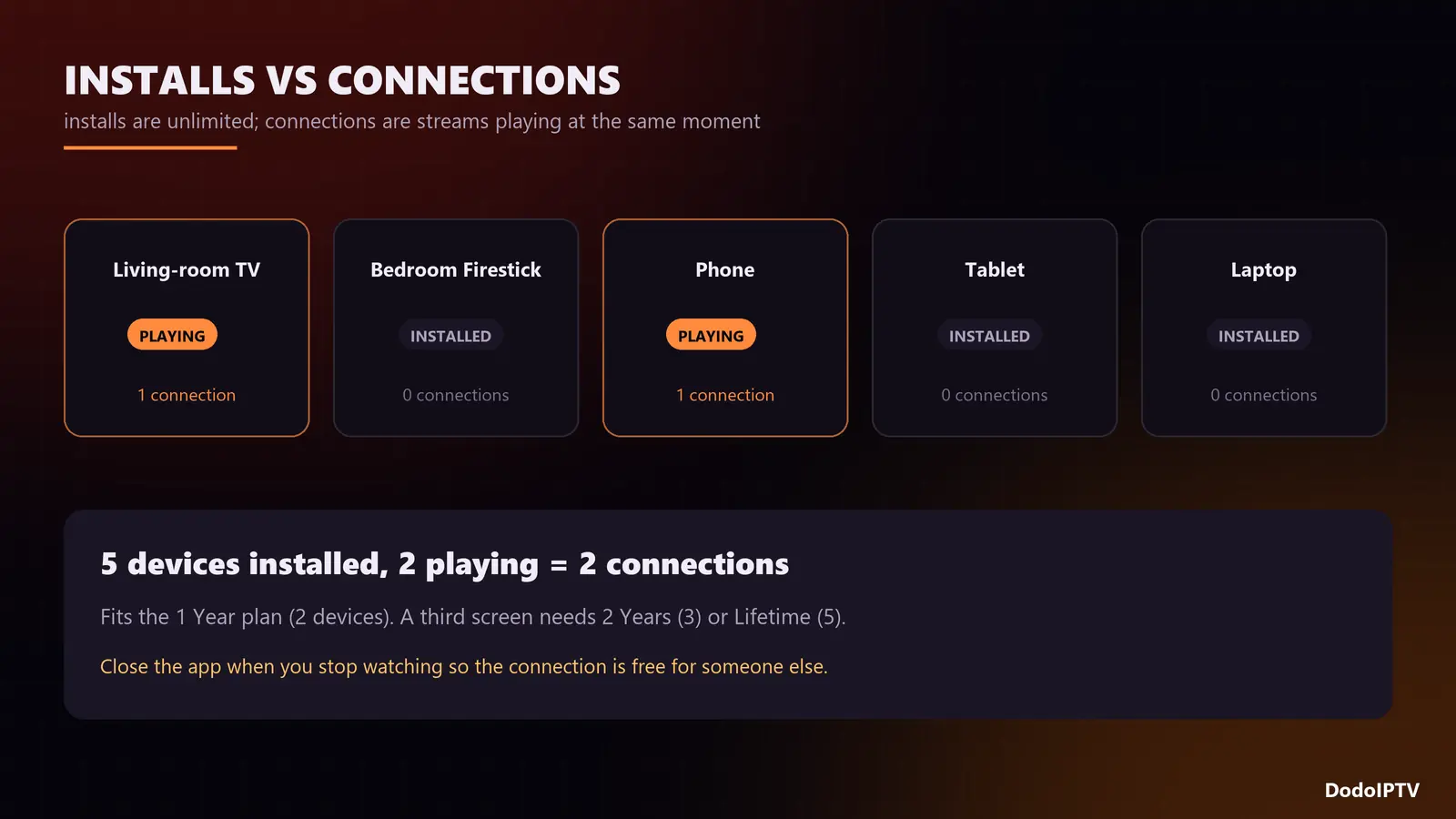
An install is the app sitting on a device. A connection is a stream actually playing. Providers count connections, not installs, because every live stream uses server bandwidth while an idle app uses none.
- Installed on a living-room TV, a bedroom Firestick, two phones and a laptop, but only one playing: 1 connection.
- Living-room TV on the match while a phone plays a film: 2 connections.
- Three TVs on at once during a family evening: 3 connections.
Pausing usually still holds the connection for a short while; closing the app or switching the device off releases it.
What Happens If You Exceed the Limit?
Depending on the provider’s system, one of three things happens when an extra screen starts playing:
- The new stream will not open and the player shows “max connections reached” or a similar error.
- The new stream plays and the oldest stream stops, which looks like a random freeze on another TV.
- Both streams stutter while the server sorts out who is allowed to play.
If one TV freezes every time someone else in the house starts watching, the plan’s device limit, not the server, is the most likely cause.
How Many Connections Do You Need?
Count the screens that will play at the same time on your busiest evening, not the screens you own.
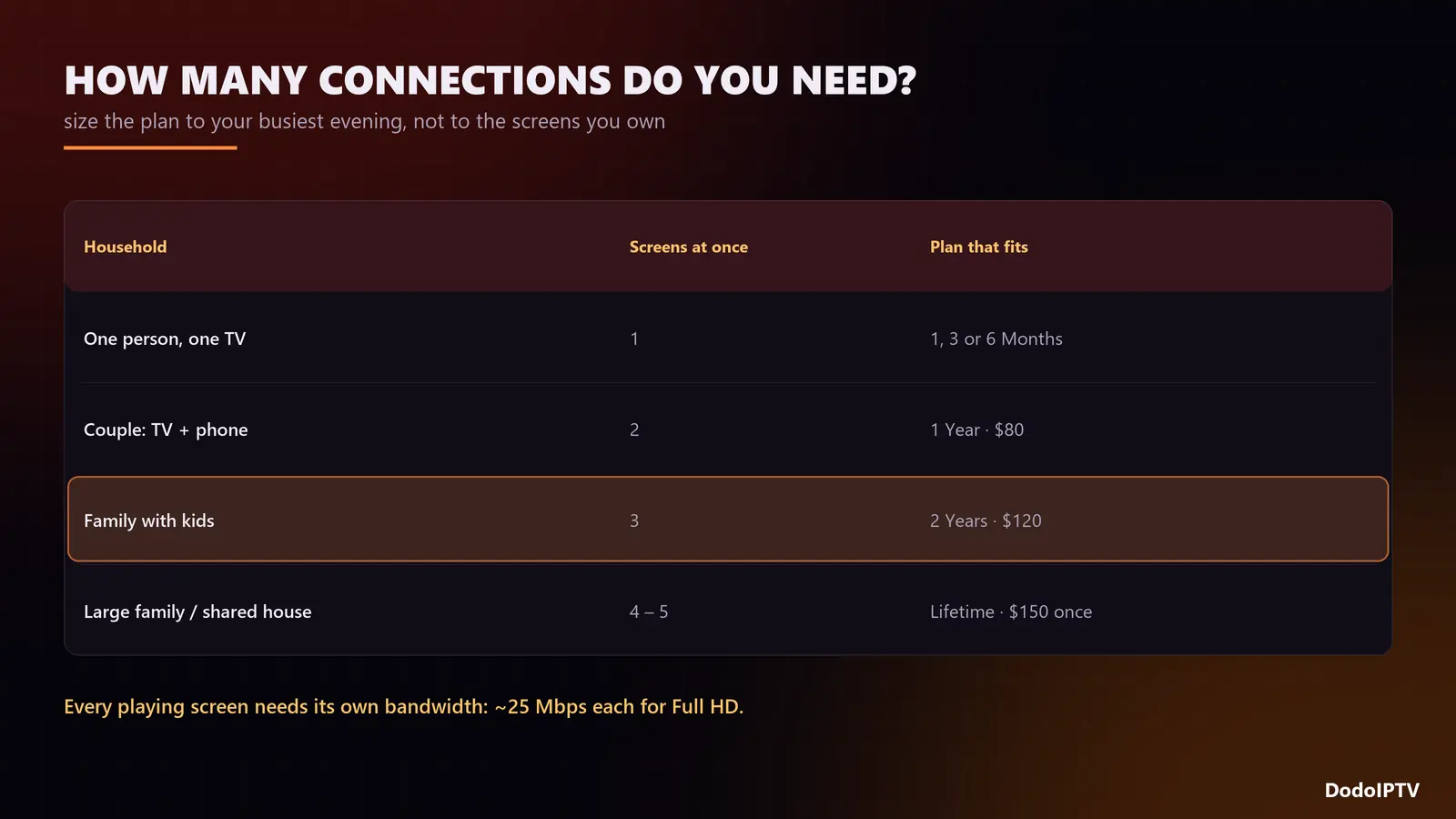
| Household | Typical screens at once | DodoIPTV plan that fits |
|---|---|---|
| One person, one TV | 1 | 1 Month, 3 Months or 6 Months |
| Couple, TV plus a phone or tablet | 2 | 1 Year (2 devices) |
| Family with kids | 3 | 2 Years (3 devices) |
| Large family or shared house | 4 to 5 | Lifetime (5 devices) |
DodoIPTV devices per plan
| Plan | Price | Devices at the same time |
|---|---|---|
| 1 Month | $15 | 1 |
| 3 Months | $35 | 1 |
| 6 Months | $55 | 1 |
| 1 Year | $80 | 2 |
| 2 Years | $120 | 3 |
| Lifetime | $150 once | 5 |
Need more screens than your plan includes? Extra connections can be added to any plan; message support. Full details are on the pricing page.
Check your bandwidth too
Every playing screen needs its own share of your internet: about 15 Mbps for HD, 25 for Full HD and 35 for 4K. Three screens in Full HD need around 75 Mbps of steady speed. If the connection is modest, let the second and third screens run in HD and keep 4K for the main TV. Our 4K IPTV guide goes deeper into bandwidth per stream.
How to Set Up One IPTV Line on Several Devices
- Use the same login everywhere. You do not need a separate account per device; the Xtream Codes details or M3U link from your welcome message work on all of them.
- Install a player on each device. TiviMate or IPTV Smarters Pro on Firestick and Android, an Xtream-compatible player on Smart TVs and iPhones. On Firestick, follow our IPTV Smarters Pro guide.
- Enter the details exactly as sent, including
http://and the port number. - Load the TV guide on each device. Each player keeps its own copy of the EPG; see what EPG is and how to load it.
- Close the app when you finish watching so the connection is released for someone else.
MAG boxes and some Smart TV apps work by MAC address rather than username. Each of those devices needs its MAC registered on the line; support does it in a couple of minutes.
Fixing “Max Connections Reached”
| Cause | How to tell | Fix |
|---|---|---|
| Another screen is genuinely playing | Someone else is watching right now | Stop one stream or move to a plan with more devices |
| A “ghost” stream from a device left on | No one is watching, but the error persists | Close the app on every device, wait 2 to 3 minutes, try again |
| Two apps open on the same device | Recording or picture-in-picture is running | Stop the recording or the second player |
| Login shared outside the home | Errors at odd hours | Ask support to reset the password |
If the error appears with every device switched off, message support with your username and the time it happened. For other errors, our IPTV not working checklist covers the rest.
Can I Use IPTV Outside My Home?
Yes. The login works on any internet connection, so your phone or tablet can play at work, at a friend’s house or abroad, and it counts as one connection like any other. Hotel and office Wi-Fi sometimes block streaming ports; mobile data or a different network usually solves it.
Frequently Asked Questions
Can IPTV be used on multiple devices?
Yes. Install it on as many devices as you want. The plan sets how many can play at the same time: 1, 2, 3 or 5 on DodoIPTV depending on the plan.
Can two people watch IPTV at the same time on one account?
Yes, if the plan includes at least 2 connections. DodoIPTV’s 1 Year plan allows 2, the 2 Year plan 3 and the Lifetime plan 5.
Do I need a separate subscription for each TV?
No. One subscription with enough connections covers every TV in the house.
Does installing IPTV on a new device log out the old one?
No. Logging in does not use a connection; only playing does.
Why does my TV freeze when someone else starts watching?
Your plan has fewer connections than the screens playing, so the newest stream pushes the oldest one off. Close one stream or upgrade to a plan with more devices.
Can I add more devices later?
Yes. Extra connections can be added at any time, or you can upgrade and have the unused part of your current plan credited.