Short answer: EPG stands for Electronic Programme Guide. On IPTV it is the TV schedule your player shows next to each channel: what is on now, what is next, and the listings for the coming days. The provider publishes the guide as an XMLTV file, and your player matches each listing to a channel using an ID called tvg-id. When the guide is empty or shows the wrong programmes, the cause is almost always one of three things: the guide has not been downloaded yet, the time offset is wrong, or a channel’s ID does not match.
This guide explains how the EPG works, what it lets you do, how to load it in the popular players, and how to fix the usual problems in a few minutes.
What Does EPG Mean on IPTV?
The EPG is the on-screen TV guide for your IPTV channels. It replaces the paper listings and the cable-box guide. In most players you open it with a “TV Guide” button, and you see a grid: channels down the side, time across the top, programmes in the cells.
Good EPG data includes more than titles: programme descriptions, episode numbers, genres, sometimes posters. It also unlocks features that depend on knowing what is on when, such as catch-up, reminders and recording.
How Does IPTV EPG Work?
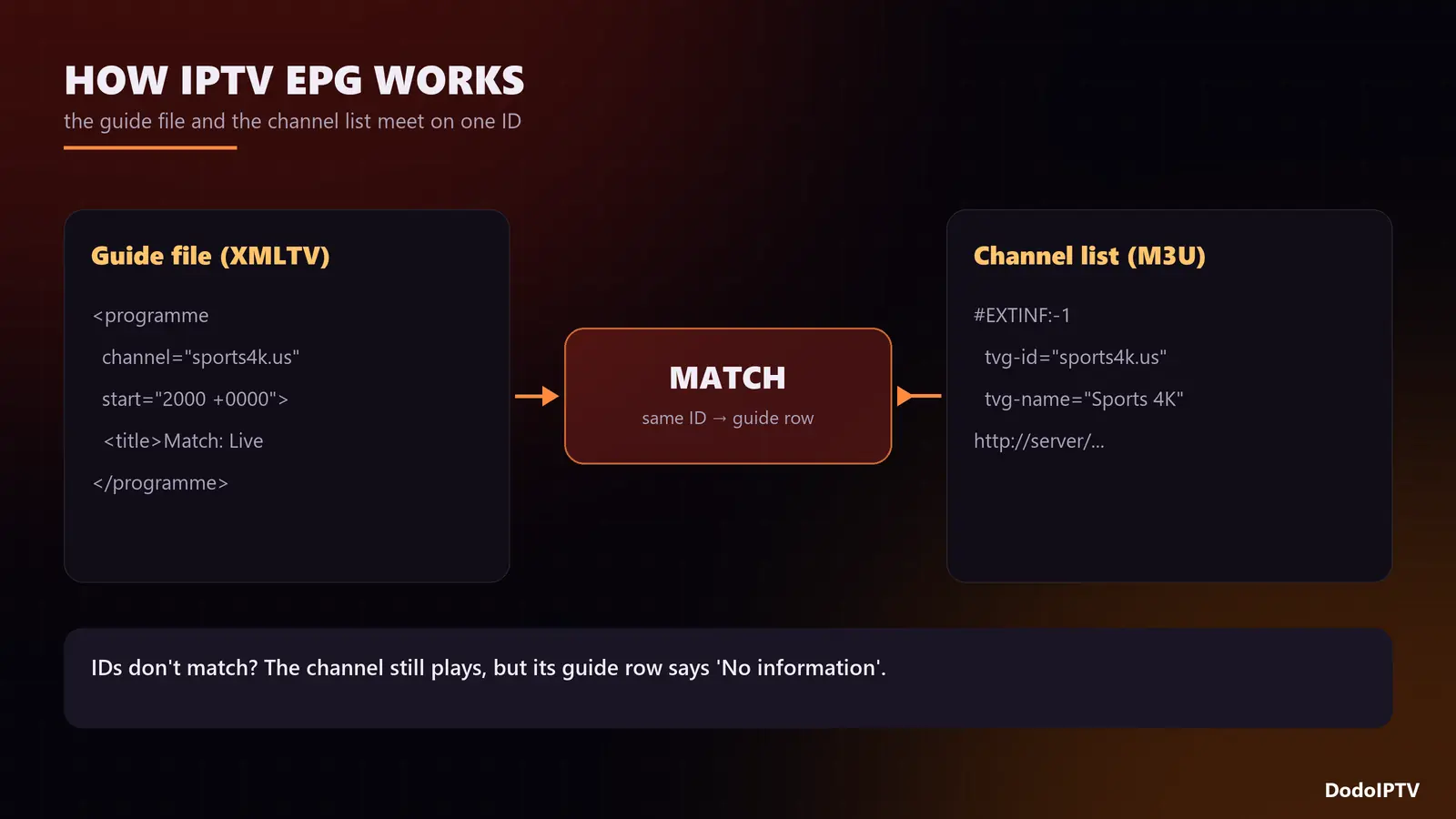
Three pieces fit together:
- The guide file. Your provider publishes an XMLTV file: a long list of programmes, each with a channel ID, start time, end time, title and description. With Xtream Codes logins the player fetches it automatically; with M3U logins it is often a separate URL.
- The channel list. Each channel in your playlist carries a
tvg-idtag, such asbbcone.ukorespn.us. - The match. The player puts each programme on the channel whose
tvg-idmatches. If the IDs do not match, the channel plays fine but its guide row says “No information”.
Times in XMLTV are stored with a time zone offset, and the player converts them to your device’s local time. That conversion is where “the guide is one hour off” comes from.
What You Can Do With a Working EPG
| Feature | What it does | Needs |
|---|---|---|
| Now and next | Shows what is on without switching channel | EPG only |
| Full guide grid | Browse days ahead, channel by channel | EPG only |
| Catch-up | Replay a programme from the past few days | EPG plus catch-up on that channel |
| Reminders | Alert before a match or show starts | EPG plus a player that supports it |
| Recording | Record a programme straight from the guide | EPG plus a player with recording (e.g. TiviMate Premium) |
| Search by programme | Find “Champions League” across all channels | EPG plus a player with guide search |
DodoIPTV includes the full EPG on every plan, mapped to the channel list so the guide lines up out of the box.
How to Load the EPG in Popular Players
IPTV Smarters Pro
Log in with Xtream Codes API and the guide comes with it. Open Live TV and use the option to install or refresh the EPG; the first download takes a minute. New to the app? See installing IPTV Smarters Pro on Firestick.
TiviMate
Add the playlist with your Xtream details and TiviMate fills in the EPG source automatically. With an M3U login, go to Settings → EPG → Add EPG source and paste the XMLTV link from your provider. Set the update interval to once a day.
Other players
Most Xtream-compatible players load the guide automatically. For M3U-only players, look for an “EPG URL” or “XMLTV” field in the playlist settings. VLC plays M3U links but has no real guide; it is a test tool, not a daily player. Our player comparison rates seven apps on guide quality.
EPG Not Showing? Fixes in Order
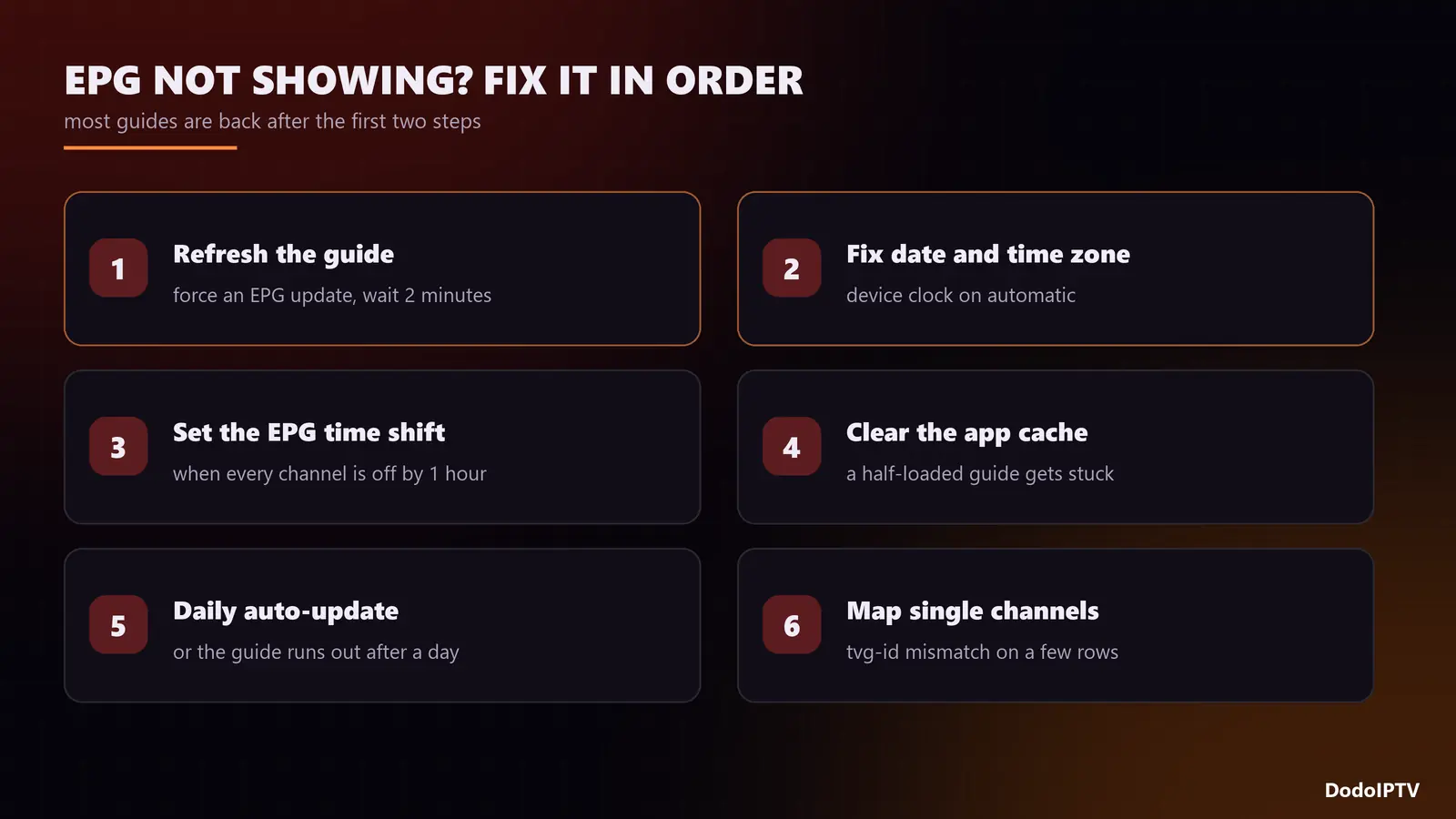
- Refresh the guide. Force an EPG update in the player and wait a couple of minutes. Big guides with thousands of channels take a while on a Firestick.
- Check the device’s date, time and time zone. If the TV thinks it is in another time zone, every programme shifts. Set time to automatic in the device settings.
- Use the EPG time shift. If every channel is off by the same amount, such as exactly one hour, set the player’s time shift or offset to correct it. Daylight-saving changes are the usual trigger.
- Clear the app cache. A half-downloaded guide can get stuck. Clear the cache (not the data) and refresh again.
- Check the update interval. If the guide runs out after a day or two, the player is not refreshing it. Set daily updates.
- Look for one-channel problems. If only some channels say “No information”, their IDs do not match the guide. Use the player’s option to assign a guide row manually, or tell support which channels are affected.
- Re-add the playlist. As a last resort, remove the login and add it again so the player rebuilds channels and guide from scratch.
Quick diagnosis
| Symptom | Most likely cause |
|---|---|
| Whole guide empty | Not downloaded yet, or wrong EPG URL on an M3U login |
| Every channel off by the same time | Time zone or time shift setting |
| A few channels empty | tvg-id mismatch on those channels |
| Guide stops after a day | Automatic update turned off |
| Guide very slow to open | Device short on memory; clear cache, close other apps |
If the channels themselves will not play, that is a different problem; see the IPTV not working checklist or the buffering fixes.
Frequently Asked Questions
What is EPG on IPTV?
The electronic programme guide: the TV schedule your IPTV player shows for each channel, now, next and for the days ahead.
What does EPG stand for?
Electronic Programme Guide (Electronic Program Guide in American English).
Why is my IPTV EPG not showing?
Usually the guide has not finished downloading, the device time zone is wrong, or on an M3U login the EPG URL was never added. Refresh, check the time settings, and add the XMLTV link if needed.
Why is my IPTV guide one hour off?
A time zone or daylight-saving mismatch. Set the device clock to automatic and adjust the player’s EPG time shift until programmes line up.
Does every IPTV plan include EPG?
At DodoIPTV, yes: the full guide is included on every plan, from 1 month to Lifetime.
Can I record from the IPTV guide?
With a player that supports recording, such as TiviMate Premium, yes. Pick the programme in the guide and choose record.