Short answer: when IPTV stops working, find out first whether the problem is everything or one thing. If no channel plays on any device, check that your subscription is active, restart the device and router, and test your internet. If one app fails, clear its cache or log in again. If only one channel fails, the source is usually down and comes back on its own. Work through the ten checks below in order and you will find the cause in under fifteen minutes, or know exactly what to tell support.
If the picture plays but keeps freezing, that is buffering, which has its own causes; our IPTV buffering fixes cover it in depth.
Quick Triage: What Exactly Is Broken?
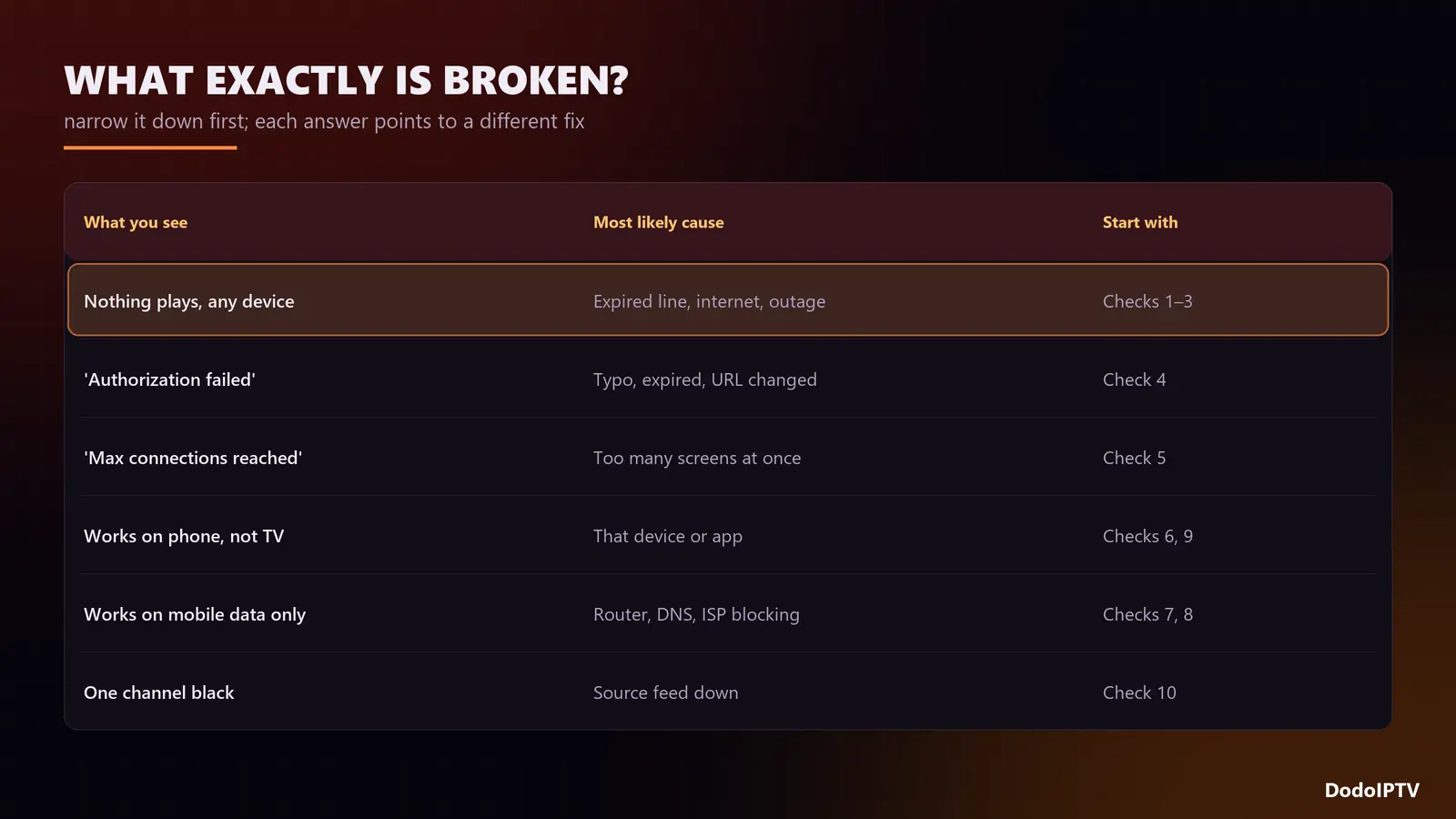
| What you see | Most likely cause | Start with |
|---|---|---|
| Nothing plays, on any device | Expired line, internet down, or a provider outage | Checks 1, 2 and 3 |
| “Authorization failed” or “invalid login” | Typo, expired subscription, changed server URL | Check 4 |
| “Max connections reached” | Too many screens playing at once | Check 5 |
| Works on the phone, not on the TV | That device or app | Checks 6 and 9 |
| Works on mobile data, not on home Wi-Fi | Router, DNS or ISP blocking | Checks 7 and 8 |
| One channel black, the rest fine | Source feed down | Check 10 |
| Plays but freezes every few seconds | Buffering, not an outage | Buffering fixes |
Check 1: Is IPTV Down for Everyone?
Before you change anything at home, find out whether others have the same problem. Message your provider’s support and ask. A good provider knows about an outage within minutes and tells you. DodoIPTV runs load-balanced servers with automatic failover, so full outages are rare, but individual channels can drop when a source has a problem.
Check 2: Restart the Device and the Router
It sounds too simple, but it fixes a surprising share of problems. Unplug the streaming device and the router for 30 seconds, plug the router in first, wait until its lights settle, then start the device. This clears stuck network sessions, frees memory on a Firestick, and gets a fresh address from your internet provider.
Check 3: Test Your Internet on the Same Device
Run a speed test on the TV or stick itself, not on your phone. You need about 15 Mbps for HD, 25 for Full HD and 35 for 4K, steadily. If other apps such as YouTube also struggle, the problem is your connection, not IPTV. A wired Ethernet connection removes Wi-Fi dropouts entirely.
Check 4: Login Errors and Expired Subscriptions
“Authorization failed”, “invalid username or password” or an empty channel list after logging in usually means the login is wrong or the line has expired.
- Check the expiry date in the app’s account section; most players show it.
- Retype the username and password exactly: watch capital letters, zeros and trailing spaces.
- Keep
http://and the port number in the server URL, for example:8080. - If your provider changed servers, ask support for the current URL.
Check 5: Too Many Screens at Once
Every plan allows a set number of devices playing at the same time. On DodoIPTV that is 1 on the 1, 3 and 6 month plans, 2 on the 1 Year plan, 3 on the 2 Year plan and 5 on the Lifetime plan. If someone else in the house is watching, or an app was left playing on another TV, the next stream is refused. Close the app on the other devices and wait two or three minutes. The full explanation is in IPTV on multiple devices.
Check 6: Clear the App Cache or Reinstall
A corrupted cache makes players hang on the loading screen or show empty categories. On Firestick and Android TV: Settings → Applications → Manage Installed Applications → your player → Clear cache. If that fails, clear data (you will need to log in again) or reinstall. Also check for an app update; old versions sometimes stop talking to newer servers. Our guide to IPTV Smarters Pro on Firestick shows how to update it.
Check 7: Change the DNS
Your internet provider’s DNS servers translate the IPTV server’s name into an address. When they are slow or broken, the player cannot find the server even though your internet works. Set the device or router DNS to a public resolver such as Cloudflare 1.1.1.1 or Google 8.8.8.8, then restart the app.
Check 8: Is Your Internet Provider Blocking or Throttling?
If IPTV works on mobile data but not on your home broadband, your internet provider may be filtering or slowing the traffic, often only in the evening. The test: connect the device to your phone’s hotspot and try the same channel. If it plays instantly, the block is on your home line. A VPN can route around throttling; pick one with servers close to you, since a distant server adds lag. Ask support too: providers sometimes offer an alternative server address.
Check 9: Date, Time and Storage on the Device
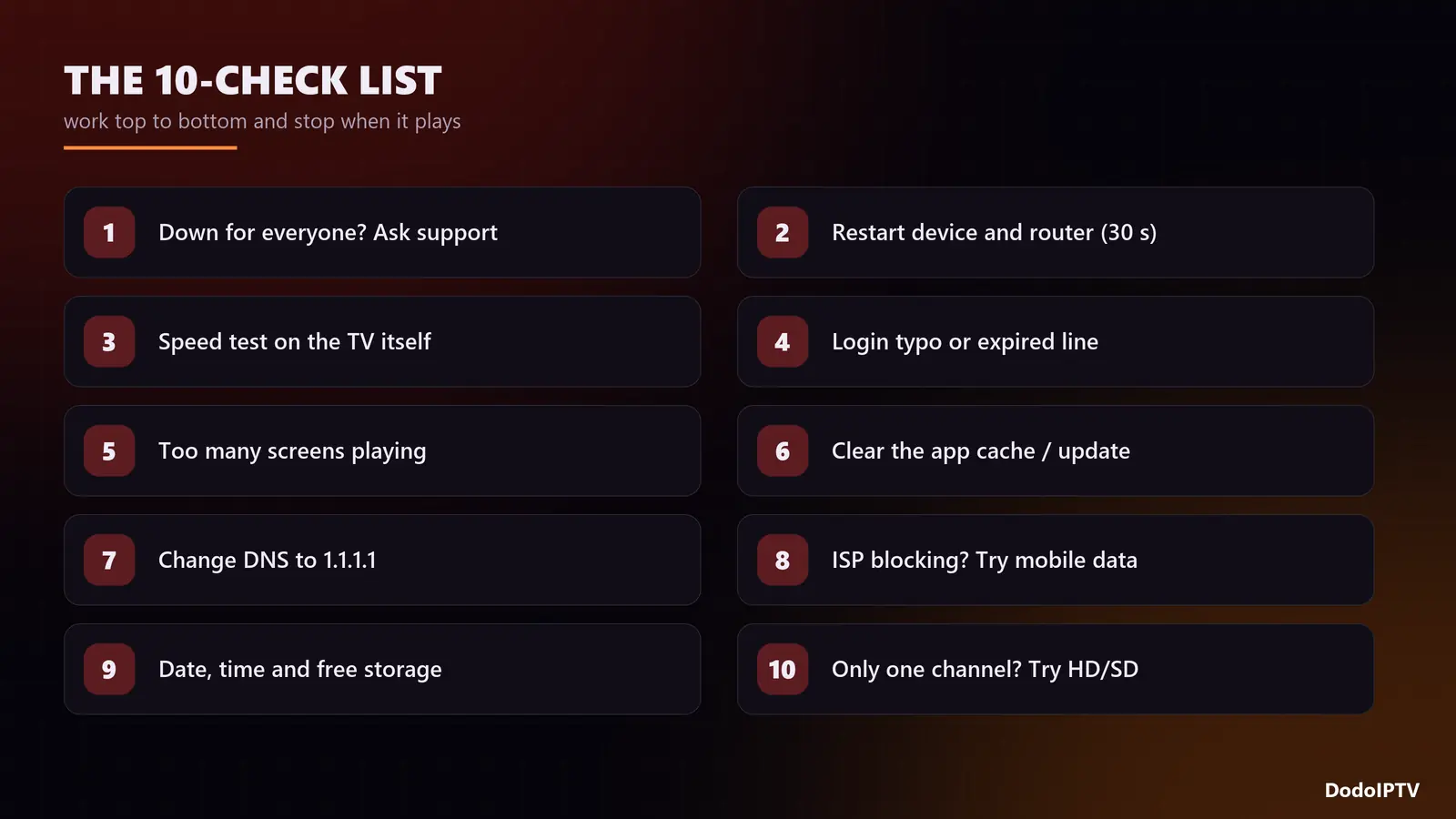
A device with the wrong date fails secure connections, and some players refuse to log in. Set date and time to automatic. Also check free storage: a Firestick with less than 500 MB free struggles to load a large channel list and guide. Uninstall apps you do not use and clear caches.
Check 10: Only One Channel Is Down
If one channel is black or shows “stream not available” while the rest play, the problem is that channel’s source, not your setup. Sources drop briefly, especially just before big events. Try the same channel in another quality (FHD, HD or SD) since the versions often come from different feeds. If it is still down after an hour, report the channel name to support so they can switch the source.
When to Contact Support, and What to Send
If you have been through the checks, message support with:
- Your username (never your password in a public place)
- The device and app you use
- The exact error message, or a photo of the screen
- Whether it affects all channels or one, and since when
- Whether it works on mobile data
With those five details, DodoIPTV’s support team can usually fix the problem in one reply. We are on WhatsApp 24/7.
Frequently Asked Questions
Why is my IPTV not working today?
Most often an expired line, a home internet or router problem, or a cache issue in the app. Check whether it fails on every device or just one, then work through the checks above in order.
Is IPTV down right now?
Ask your provider’s support; they can confirm an outage in minutes. If other people using the same service are fine, the problem is on your side.
Why does IPTV work on my phone but not my TV?
The TV’s app or network is the issue. Clear the player’s cache, check the device date and storage, and test the TV’s connection with a speed test.
Why does IPTV work on mobile data but not on Wi-Fi?
Your home router, DNS or internet provider is blocking or slowing the stream. Change DNS first; if that fails, test with a VPN or ask support for an alternative server.
Why do I get “authorization failed”?
The username, password or server URL is wrong, or the subscription has expired. Retype the details exactly and check the expiry date.
Why does IPTV keep freezing?
That is buffering rather than an outage: usually Wi-Fi, a weak device or a small player buffer. See our 12 buffering fixes.