Short answer: to install IPTV Smarters Pro on a Firestick, turn on Developer Options (Settings → My Fire TV → About → click the device name seven times), install the free Downloader app from the Amazon store, allow Downloader to install unknown apps, then use it to download the IPTV Smarters Pro APK from the official IPTV Smarters website. Open the app, choose Login with Xtream Codes API, and enter the username, password and server URL your provider sent. The whole job takes about ten minutes.
Below is every step with the exact menu names, the login screen explained field by field, the settings worth changing, and fixes for the errors people hit most often.
What You Need Before You Start
- A Fire TV device: Fire TV Stick, Fire TV Stick 4K or 4K Max, Fire TV Cube, or a Fire TV Smart TV. Any model from the last five years works.
- Your IPTV login: either Xtream Codes details (server URL, username, password) or an M3U link. DodoIPTV sends these on WhatsApp within 5 to 15 minutes of ordering, or straight away with the free 24-hour trial.
- A steady connection: 25 Mbps for Full HD, 35 Mbps for 4K. A $15 Ethernet adapter makes the biggest difference on a Firestick.
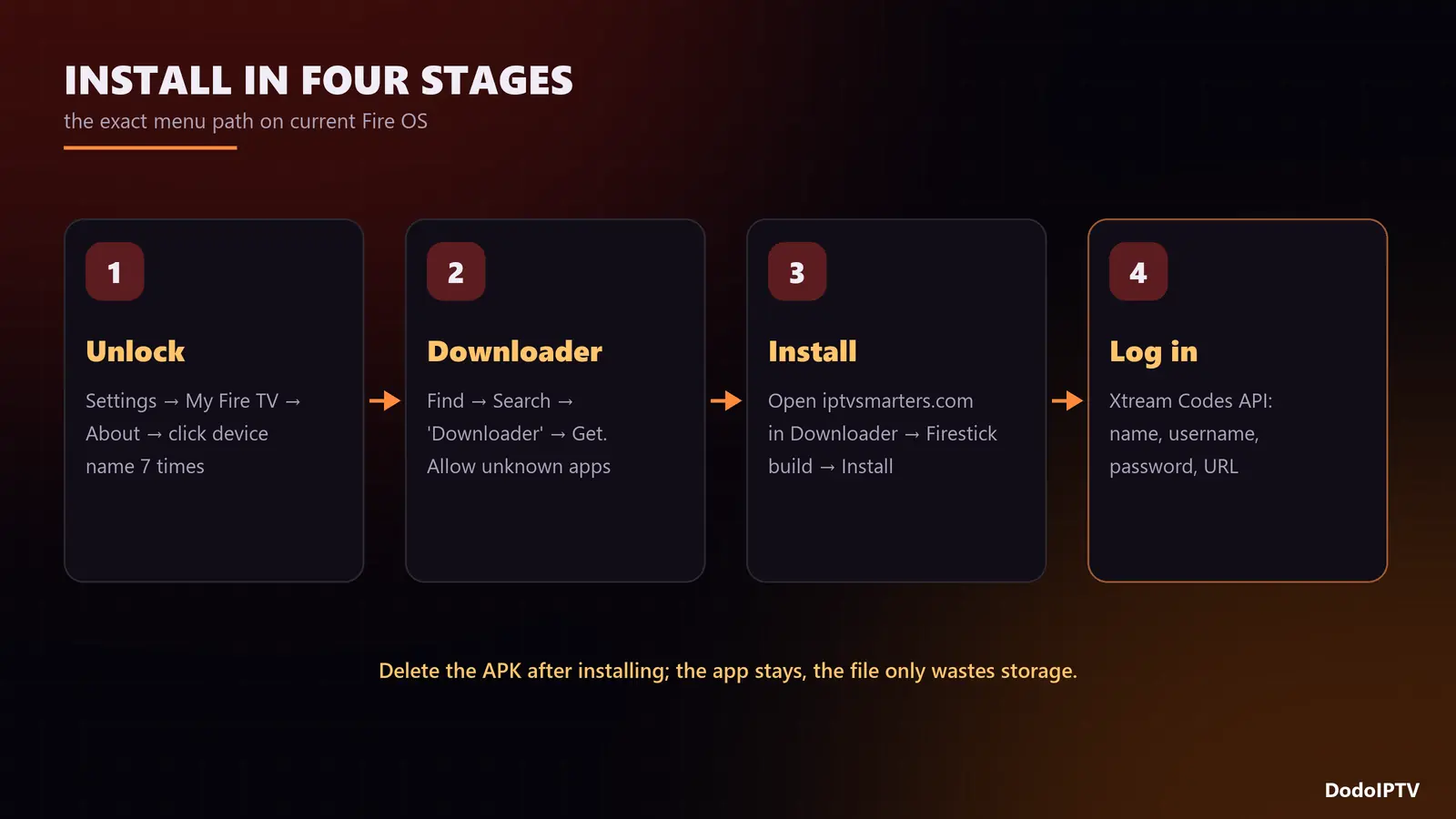
Step 1: Turn On Developer Options
Amazon hides the setting that allows apps from outside its store until you unlock Developer Options.
- From the home screen, open Settings (the gear icon on the right).
- Go to My Fire TV → About.
- Highlight the first line, your device name (for example “Fire TV Stick 4K”), and press the select button seven times. A message confirms you are now a developer.
- Press back once. Developer Options now appears in the My Fire TV menu.
On older Fire OS versions Developer Options is already visible, with a setting called Apps from Unknown Sources instead of a per-app switch.
Step 2: Install the Downloader App
- Go back to the home screen and open Find → Search.
- Type Downloader and select the orange app by AFTVnews.
- Choose Get or Download. It is free.
- Return to Settings → My Fire TV → Developer Options → Install unknown apps and switch Downloader to ON.
Downloader is simply a small browser that can save and install APK files. You will use it for this one job; you can keep it for future updates.
Step 3: Download and Install IPTV Smarters Pro
- Open Downloader and allow it access to files when asked.
- In the URL box, type the address of the official IPTV Smarters website, iptvsmarters.com, and open its downloads section.
- Select the Firestick / Android TV version of IPTV Smarters Pro. The file downloads in a few seconds.
- When the installer opens, choose Install, then Done.
- Downloader offers to Delete the APK file. Delete it; the app is installed and the file only wastes storage.
In some regions IPTV Smarters Pro also appears in the Amazon app store. If a search finds it there, installing from the store is fine and updates arrive automatically. Avoid APKs from random mirror sites: modified copies are a real security risk.
Put the app on your home screen
Sideloaded apps land at the end of Your Apps & Channels. Hold the home button, choose Apps, highlight IPTV Smarters Pro, press the menu button (three lines) and choose Move to front.
Step 4: Log In With Xtream Codes
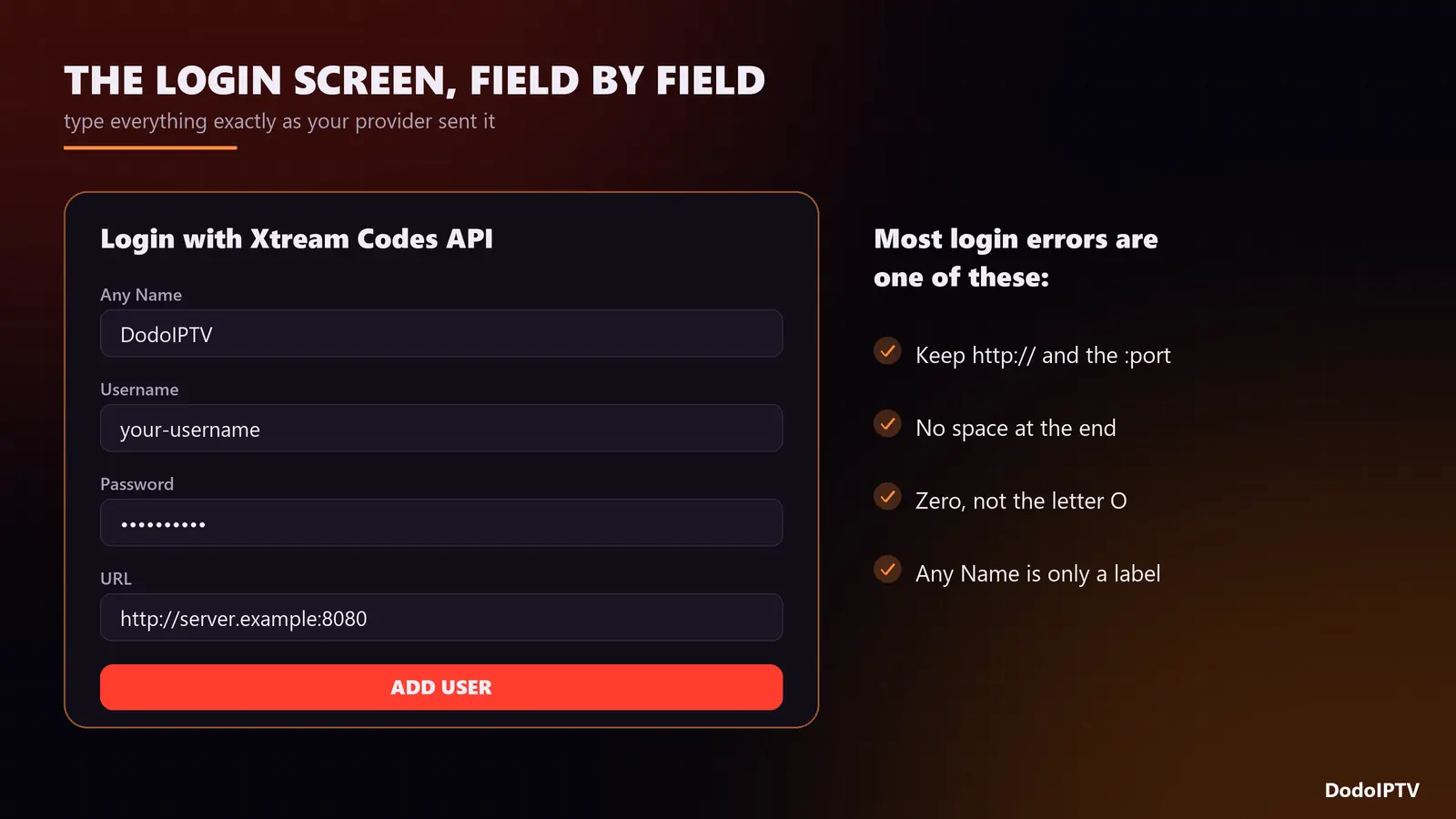
Open IPTV Smarters Pro, accept the terms, and pick “Login with Xtream Codes API”. You will see four fields:
| Field | What to type | Common mistake |
|---|---|---|
| Any Name | Anything, such as “DodoIPTV” | None; it is only a label |
| Username | Exactly as sent | Capital letters swapped, extra space at the end |
| Password | Exactly as sent | Letter O typed instead of zero |
| URL | Server URL including http:// and the port, e.g. http://server.example:8080 |
Missing http:// or the :port |
Select Add User. The app downloads your live channels, films, series and TV guide; give it a minute on the first load. If you only received an M3U link, choose Load Your Playlist or File/URL instead and paste it, although Xtream is better because it brings the films, series and guide in automatically.
Your DodoIPTV line includes 90,000+ live channels and 270,000+ films and series; if you need more than one screen at once, check how many devices your plan allows.
Step 5: Settings Worth Changing
- Load the TV guide. Open Live TV and use the option to install or refresh the EPG. If programmes show the wrong times, use the EPG time shift setting. Our EPG guide explains why it happens.
- Stream format. In Settings, look for the stream format option. If channels stutter on the default, try HLS; on a wired connection MPEG-TS can be slightly faster to zap.
- Decoder. In the player settings, switch between hardware and software decoding if a channel shows a black screen with sound, or sound with no picture.
- Automation. Turn on automatic channel and EPG updates so new channels appear without logging in again.
- Parental control. Set a PIN and lock the adult categories if children use the TV.
Fixing Common IPTV Smarters Errors on Firestick
| Error | Likely cause | Fix |
|---|---|---|
| “There was a problem parsing the package” | Download incomplete or wrong version | Delete the file, download again in Downloader, choose the Firestick build |
| “Authorization failed” or “Invalid username or password” | Typo, expired line or wrong URL | Retype carefully, keep http:// and the port, check the line has not expired |
| Channels load but the guide is empty | EPG not downloaded yet | Refresh the EPG from Live TV and wait a minute |
| Buffering on every channel | Wi-Fi drops or a small buffer | Ethernet adapter, change stream format; see our buffering fixes |
| App freezes on the loading screen | Cache full, low storage | Settings → Applications → Manage Installed Applications → IPTV Smarters Pro → Clear cache |
| “Max connections reached” | Another screen is already playing | Stop the other stream or move to a plan with more devices |
Anything else? Our IPTV not working checklist works through ten checks in order.
IPTV Smarters Pro Alternatives on Firestick
Smarters is free and easy, but it is not the only option. TiviMate has the best TV guide layout and recording on Android TV devices, with a small yearly fee for Premium. Other Xtream-compatible players work too. We tested seven of them in the best IPTV player comparison, and the general Firestick IPTV setup guide covers the TiviMate route.
Frequently Asked Questions
Is IPTV Smarters Pro free?
The app is free to download and use. It contains no channels; you add those with the login from your IPTV subscription.
Is IPTV Smarters Pro on the Amazon app store?
In some regions, yes. If a search in the Fire TV store finds nothing, install it with Downloader from the official IPTV Smarters website as described above.
Why can’t I find Developer Options on my Firestick?
It is hidden on newer Fire OS versions. Go to Settings → My Fire TV → About and click your device name seven times to unlock it.
Can I use the same login on two Firesticks?
Yes. Install Smarters on both and use the same details. How many can play at once depends on your plan: 2 on DodoIPTV’s 1 Year plan, 3 on the 2 Year plan and 5 on Lifetime.
How do I update IPTV Smarters Pro?
Download the newer version through Downloader and install it over the old one. Your login and favourites are kept.
Do I need a VPN for IPTV Smarters on Firestick?
Not to make it work. A VPN only helps if your internet provider slows down streaming in the evening.